VMProtect Software
  • Products
    • VMProtect
      Protect your software code.
      Overview Purchase Docs
    • Web License Manager
      Manage your product licenses online.
      Overview Purchase Docs
  • News
  • Support
    • Contact Us
      Reach out via filling in the letter form.
      Go to Contact
    • Downloads
      See all downloadable products.
      Go to Downloads
    • Forum
      Discuss our products online.
      Go to Forum
    • News
      View changelog of products.
      Go to News
Web License Manager
  • Overview
  • Purchase
  • Docs
Try Demo
Search
  • What is Online Activation and License Management?
  • Installing WebLM
    • Step 1: Uploading
    • Step 2: Database Access
    • Step 3: Creating an Administrator
    • Step 4: Completing Installation
  • Quick Start Guide
    • Step 1: Create an Agent
    • Step 2: Create a Product
    • Step 3: Generate a Serial Number
    • Step 4: Setup the Automatic Serial Number Generation
  • Licenses
    • Adding a license
    • Searching for a license
    • Editing a license
    • Copy serial number
    • Blocking compromised licenses
    • Deleting a license
    • Importing licenses
  • Activation Codes
    • Adding new activation code
    • Searching for a code
    • Editing a code
    • Displaying licenses
    • Blocking compromised codes
    • Deleting a code
    • Importing codes
  • Products
    • Adding a product
    • Adding a product mode
    • Show licenses
    • Editing / Deactivating a product
    • Keygen URL
    • Importing / Exporting a product
    • Deleting a product
  • Agents
    • Adding a new agent
  • Users
    • Adding a new user

Adding a new user

To add a new user, click the Add New button on the toolbar, or use the Add New User link in the Users section. You should see the following screen:
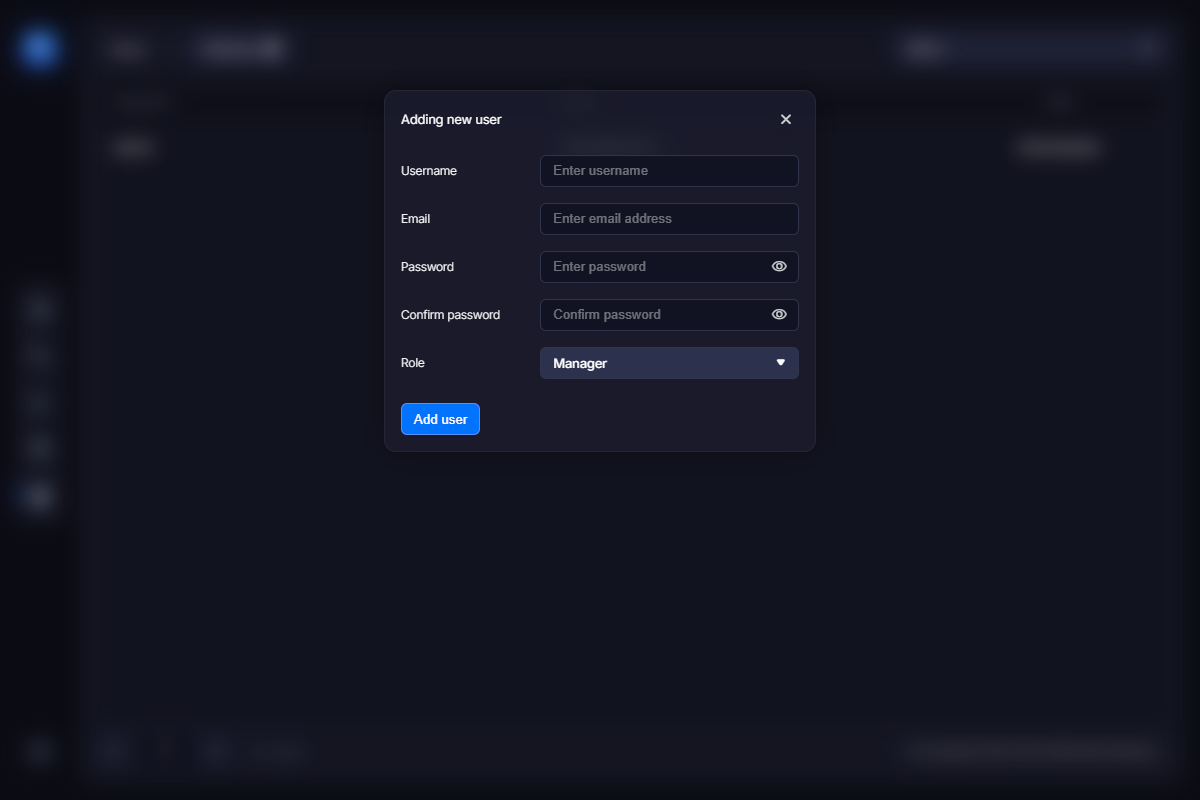
Enter the username for the new user. This will also be the user’s login. You should also enter the user’s email address and specify a password. Finally, select the user’s role — Administrator or Manager.

Last updated 11 days ago
Reach Out
    Telegram Email
Legal
  • Privacy Policy
  • License Agreement
VMProtect
  • Overview
  • Purchase
  • Docs
Web License Manager
  • Overview
  • Purchase
  • Docs
News
Support
  • Contact Us
  • Downloads
  • Forum
VMProtect Software
© VMProtect® Software