Finally, we have reached the most important part — setting up automatic serial number generation upon request from your e-commerce provider. Most e-commerce providers allow vendors to use their own serial number generators. In this case, the e-commerce provider simply calls a vendor-specific URL and passes parameters such as the customer’s name and email.
Log in to your e-commerce provider’s vendor panel and locate the custom keygen URL entry form. You can see how to configure a keygen for several popular e-commerce providers here. Now go to the products list in WebLM and locate the product you have just created. Hover over it and click the “Keygen URL” link:
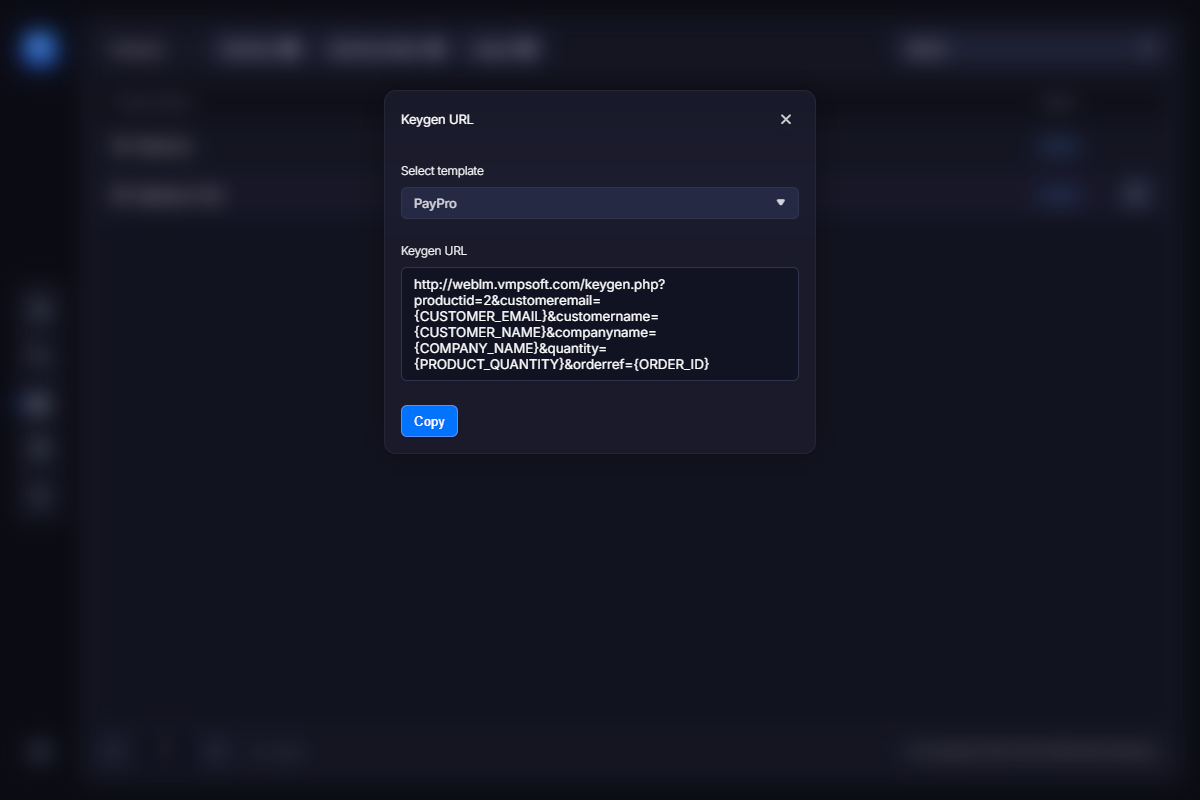
Some of the most popular e-commerce providers are hardcoded into WebLM, so you can simply copy the URL and paste it into the e-commerce provider’s form from the previous step. Otherwise, you still need to copy the URL, but you may need to adjust the template parameters so your e-commerce provider can replace them with actual customer data.
That’s all! Now place a test order and check whether a new license has been added to the list.