The “Setup” tab of the “Watermarks” dialog is used for managing watermarks:

To add a new watermark, click the corresponding button. The following dialog will open:

- Name – the name of the watermark;
- Value – the value of the watermark. You can generate a random value for the watermark by clicking the “Generate” button. The “Value” field consists of two columns: the left column allows you to enter a hex value, while the right column allows you to enter a symbolic value. When the watermark is inserted into the protected file, each “?” symbol is replaced with a random value.
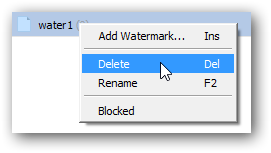
To remove or rename a watermark, use the context (right-click) menu: