You can find a detailed description of Web License Manager on our website, and here we only provide the minimum steps required to create an activation code for use with the Activation API.
First, enter Web License Manager (you can use the demo on our website) and create a product. Then export the product as a VMProtect project to configure licensing and activation. After the project is set up, all checks are added to your application code and the executable is protected, click the “Add New Code” link in the left panel in WebLM:
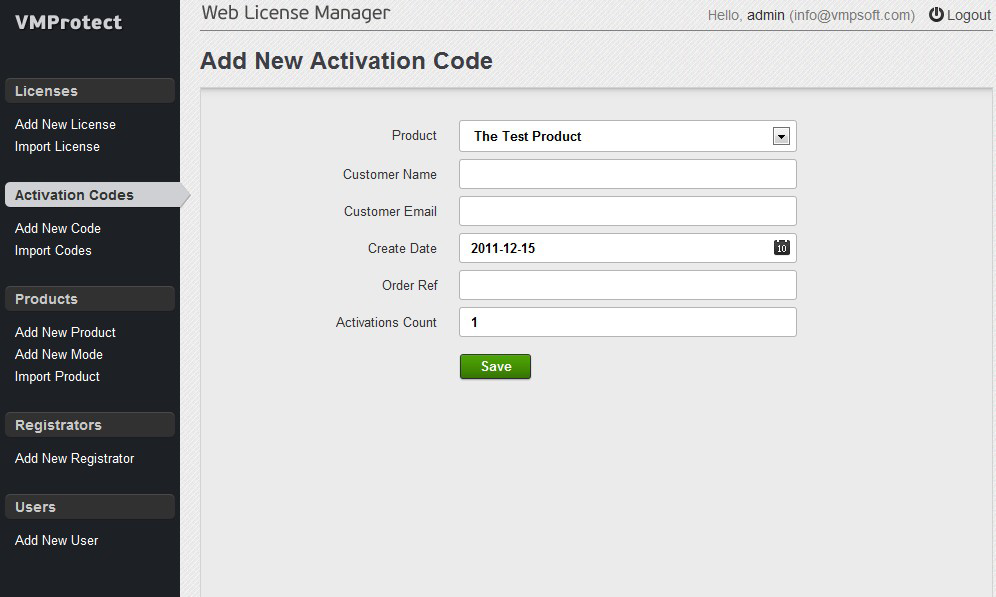
Select the required product from the top drop-down list and fill in the rest of the form with the data you want to include in the serial number. Click the “Save” button. You should then see the activation code that can be used to test the Activation API.

You can explore the full capabilities of Web License Manager (such as integration with e-commerce providers and automatic activation code generation) in the online user manual.